Most guides on how to make a website come from companies selling a single website builder. This one compares them all. At Deeploy, we optimize websites for brands in Canada and 35+ countries, and we often meet sites that look great but never get found.
This guide answers the question in full. You’ll learn the eight steps to launch a site, how every major platform compares, the technical foundations behind a fast website and how to build one that ranks on Google and gets cited by AI search engines.
How Do I Create a Site? The Short Answer
To create a site, define its goal, register a domain, choose hosting and a platform (a website builder, CMS or framework), plan your pages, design and write the content, optimize for search and speed, then test and launch. A simple site can go live in days.
How Do You Create a Website? 8 Steps From Planning to Launch
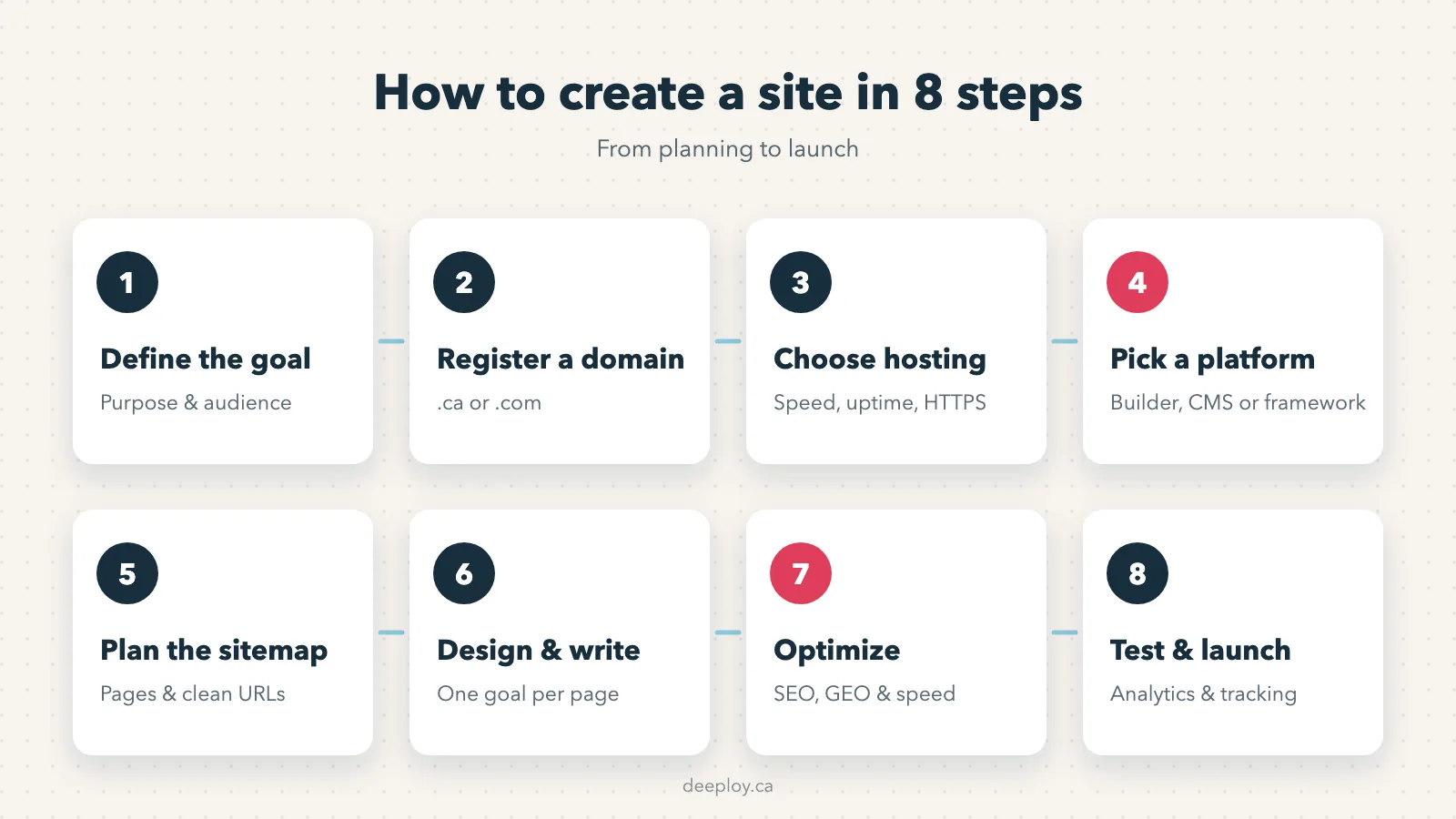
You create a website in eight steps: define the purpose, register a domain, choose hosting, pick a platform, plan the structure, design and write the pages, optimize for search, then test and launch. Early decisions shape everything that follows.
Step 1: Define the Purpose and Audience of Your Site
Start with one question: what should a visitor do on your site? Book a call, buy a product, request a quote or read your content. That goal defines the pages you need, the platform that fits and how you’ll measure success.
Then describe your audience. A site for Calgary homeowners needs different content and calls to action than one for Toronto procurement managers.
Step 2: Choose and Register a Domain Name
Your domain is your address on the web. Keep it short, easy to spell and close to your brand name. For a Canadian business, a .ca domain signals local presence and can be registered through any certified registrar.
The Canadian Internet Registration Authority (CIRA) manages .ca domains and requires registrants to meet Canadian presence requirements. If you sell internationally, a .com alongside your .ca is a common choice.
Step 3: Choose Web Hosting That Fits Your Platform
Hosting is the server space where your website’s files live. Website builders such as Wix and Squarespace include hosting. Self-hosted platforms like WordPress need a hosting provider, and modern frameworks often deploy on cloud platforms built for them.
Look at four factors: server location close to your audience, uptime, automatic backups and support for HTTPS. For Canadian audiences, data centres in Canada or the northern United States help reduce load times.
Step 4: Pick a Website Builder, CMS or Framework
This is the most important decision in the process. Website builders are fastest for beginners. A content management system (CMS) gives growing businesses more flexibility. Frameworks give developers full control over performance and design.
We compare every major option in the next section. As a rule, choose the simplest platform that can support the site you’ll need in two or three years, not only the one you need today.
Step 5: Plan Your Site Structure and Sitemap
A sitemap is the map of your pages and how they connect. Most business sites need a home page, service or product pages, an about page, a contact page and a blog. Keep every important page within three clicks of the home page.
Plan URLs at this stage too. Short, descriptive URLs such as /services/bookkeeping/ help both visitors and search engines understand each page.
Step 6: Design Pages and Write Content That Converts
Good design guides attention toward the goal you set in step 1. Use a clear visual hierarchy, consistent colours and fonts, readable text sizes and one primary call to action per page.
Write content for your customers’ real questions. Each page should answer one main intent, use the words people search for and make the next step obvious, whether that’s a form, a phone number or a booking button.
Step 7: Optimize for SEO, GEO and Speed Before Launch
Optimizing before launch is far easier than fixing problems later. Set a unique title and meta description for each page, use one H1 per page, compress images, add descriptive alt text and connect internal links between related pages.
Then prepare for AI search. Generative engine optimization (GEO) structures your content so AI assistants such as ChatGPT and Google’s AI Overviews can understand and cite it. We cover both in detail later in this guide.
Step 8: Test, Launch and Connect Analytics
Before launch, test every form, link and button on desktop and mobile. Check load speed, confirm the SSL certificate is active and make sure no page is accidentally blocked from search engines.
After launch, connect Google Analytics and Google Search Console, submit your XML sitemap and set up conversion tracking. Without data, you can’t tell which pages bring customers and which ones need work.
Website Builders, CMS and Frameworks: Which Platform Should You Use?
Use a website builder if you want a simple site fast without code. Use a CMS like WordPress if you need to publish content often and scale. Use a JavaScript framework or static site generator if you have developers and need maximum speed, custom features or complex integrations.
According to W3Techs, WordPress powers 40.1% of all websites, followed by Shopify at 5.4%, Wix at 4.2% and Squarespace at 2.4%. Here’s how each category works.
Website Builders for Beginners
Website builders are all-in-one platforms that include hosting, templates, a visual editor and security updates. You design by dragging and dropping elements, with no code required. The trade-off is less control over code, performance and data portability.
Wix, Squarespace and GoDaddy
Wix offers hundreds of templates, an app market and AI tools that generate a first draft of your site. Squarespace stands out for polished, design-led templates. GoDaddy’s builder focuses on speed: you can buy a domain and publish a basic site in one place.
All three work well for portfolios, local service businesses and small sites. They become limiting when you need advanced SEO control, custom integrations or hundreds of pages.
Shopify for Online Stores
Shopify, founded in Ottawa, is the leading hosted platform for e-commerce. It handles products, inventory, payments, taxes and shipping, with thousands of apps for extra features. If selling online is your main goal, Shopify is usually the simplest starting point.
Webflow for Design-Led Sites
Webflow combines a visual editor with professional-grade control over layout, animations and code. It generates clean HTML and CSS, includes a CMS for blogs and collections, and suits marketing teams that want custom design without managing servers.
Content Management Systems for Growing Businesses
A content management system (CMS) separates your content from your design, so non-technical teams can publish pages and posts without touching code. Self-hosted CMS platforms give you full ownership of your site and data, with the responsibility of managing hosting, updates and security.
WordPress
WordPress is open-source software built on PHP and MySQL. Its block editor, thousands of themes and plugins such as Yoast SEO and WooCommerce let it handle anything from a blog to a large online store. WordPress.org is the self-hosted version, while WordPress.com is a hosted service.
Its flexibility is also its main risk: too many plugins slow a site down and open security gaps. Regular updates and a lean plugin list keep it fast and safe.
Drupal and Joomla
Drupal is a CMS built for complex, high-security websites, with granular user permissions and strong multilingual features. It’s common in government, higher education and large enterprises, and it usually requires experienced developers.
Joomla sits between WordPress and Drupal, with built-in multilingual support for membership sites and community portals.
Headless CMS for Flexible Content
A headless CMS stores and manages content but has no front end of its own. It delivers content through an API to any website, app or device. Developers build the front end with the framework of their choice, which gives them full control over performance.
Contentful, Sanity and Strapi
Contentful is a cloud-based headless CMS widely used by enterprise teams. Sanity offers a customizable editing studio and real-time collaboration. Strapi is open-source and built on Node.js, so you can host it yourself. All three pair well with frameworks like Next.js and Nuxt.
JavaScript Frameworks for Custom Websites
JavaScript frameworks are code libraries that developers use to build fast, interactive websites and web applications from scratch. They require programming skills, but they offer the best performance and flexibility for custom features, integrations and large sites.
React and Next.js
React is a JavaScript library created by Meta for building user interfaces from reusable components. Next.js is a framework built on React that adds routing, server-side rendering and static generation. That combination makes Next.js a strong choice for sites that need speed and SEO.
Vue.js and Nuxt
Vue.js is a progressive framework known for its gentle learning curve and clear documentation. Nuxt adds server-side rendering, file-based routing and SEO features on top of Vue. Sites built with Vue alone, without server rendering, can be harder for search engines to read.
Angular
Angular is a full framework maintained by Google and written in TypeScript. It includes everything a large team needs in one package, from routing to forms and testing. It’s most common in enterprise web applications and internal platforms.
Astro and SvelteKit
Astro is built for content-heavy websites. It ships zero JavaScript by default and loads interactive components only where needed, which produces very fast pages. SvelteKit uses the Svelte compiler to generate small, efficient code and supports server rendering and static pages.
Static Site Generators
Static site generators turn templates and content files into plain HTML pages before anyone visits the site. Static pages load fast, are hard to hack and are inexpensive to host, which makes them ideal for documentation, blogs and marketing sites.
Hugo, Jekyll and Eleventy
Hugo is written in Go and builds thousands of pages in seconds. Jekyll, built on Ruby, powers GitHub Pages. Eleventy is a flexible JavaScript generator that works with many template languages. All three need some technical knowledge to set up and update.
AI Website Builders: Speed and Limitations
AI website builders from companies such as Wix, Hostinger and Framer generate a full draft site from a short description. They’re useful for testing an idea or launching a simple page in minutes.
Treat the result as a first draft: AI-generated copy tends to be generic and still needs real content, keyword research and technical review.
Website Builder vs CMS vs Framework: Side-by-Side Comparison
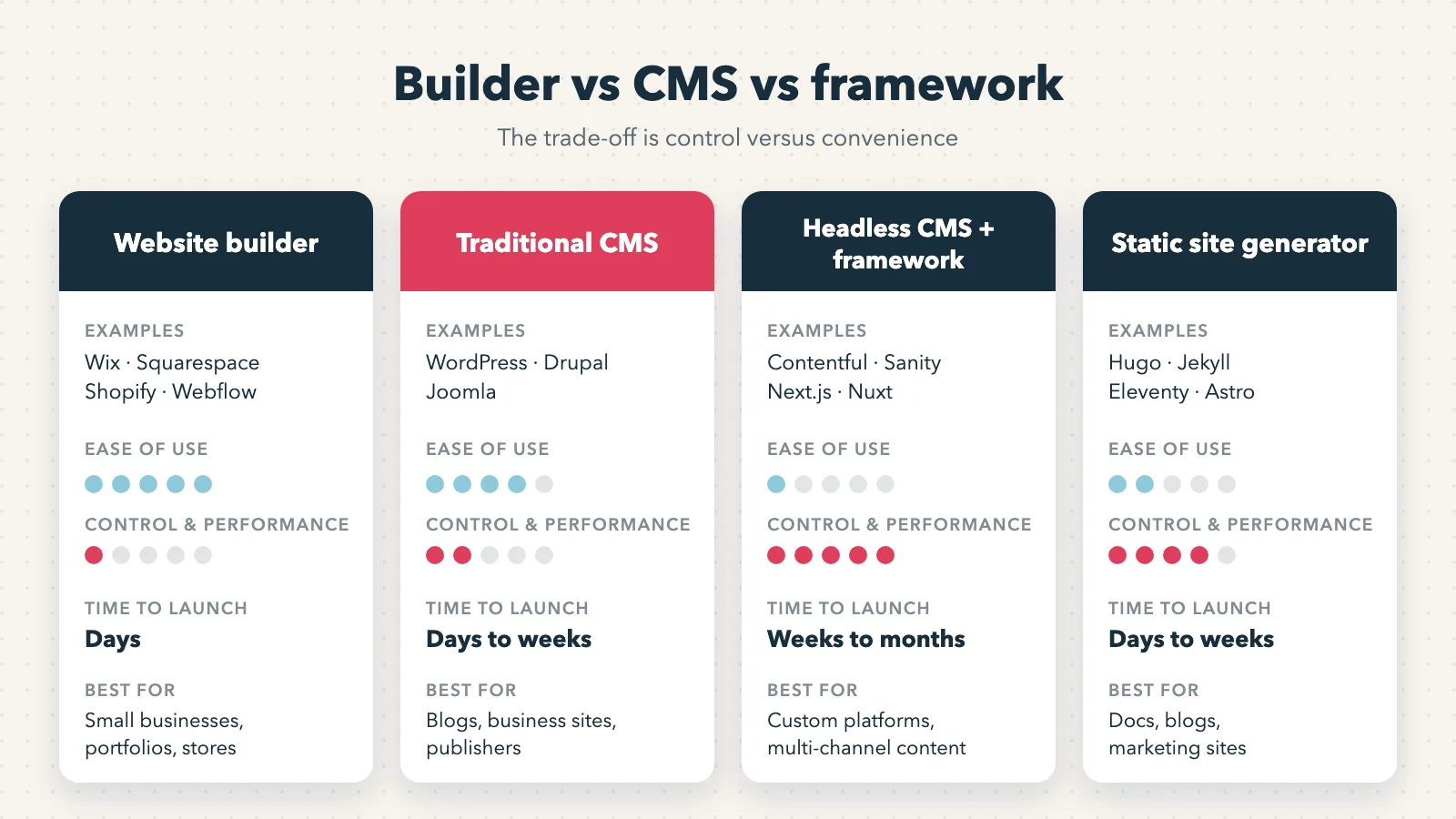
The main difference is control versus convenience. Website builders are the easiest and fastest but offer the least control. A CMS balances ease of use with flexibility. Frameworks and static generators offer full control and top performance but require developers to build and maintain.
| Factor | Website builder | Traditional CMS | Headless CMS + framework | Static site generator |
|---|---|---|---|---|
| Examples | Wix, Squarespace, Shopify, Webflow | WordPress, Drupal, Joomla | Contentful, Sanity, Strapi + Next.js, Nuxt | Hugo, Jekyll, Eleventy, Astro |
| Coding required | None | Low to medium | High | Medium to high |
| Time to launch | Days | Days to weeks | Weeks to months | Days to weeks |
| Design control | Template-based | High with themes | Full | Full |
| SEO control | Basic to good | High with plugins | Full | Full |
| Performance | Good | Varies with plugins | Excellent | Excellent |
| Scalability | Limited by plan | High | Very high | High for content sites |
| Best for | Small businesses, portfolios, stores | Blogs, business sites, publishers | Custom platforms, multi-channel content | Docs, blogs, marketing sites |
Which Type of Website Is Best for Beginners?
For beginners, a website builder such as Wix, Squarespace or Shopify is the best type of website platform. It includes hosting, templates and security, so you can publish without code. WordPress.com is a good next step if you plan to publish content often and want room to grow.
Match the platform to your goal: Squarespace or Wix for a portfolio or local service, Shopify for a store and WordPress for content. Before committing, check that you can edit titles, URLs and meta descriptions.
The Technical Foundations Every Website Needs
Every website, whatever platform you use, relies on the same foundations: HTML, CSS and JavaScript in the browser, a domain connected through DNS, an SSL certificate for HTTPS, a mobile-friendly layout, fast loading and files that help search engines crawl the site, such as an XML sitemap and robots.txt.
HTML, CSS and JavaScript: How a Web Page Is Built
Every web page uses three languages. HTML defines the structure and content, such as headings, paragraphs and images. CSS controls the presentation: layout, colours and fonts. JavaScript adds interactivity, such as menus, forms and live updates.
Builders and CMS platforms write this code for you. Understanding the basics still helps you troubleshoot problems, and MDN’s guide to how the web works is a reliable place to start.
Domains, DNS, SSL and HTTPS
The Domain Name System (DNS) translates your domain into the IP address of the server that hosts your site. You connect them through DNS records: an A record points to an IP address, and a CNAME record points to another domain.
An SSL/TLS certificate encrypts data between the browser and your server and enables HTTPS. Browsers flag sites without it as not secure. Most hosts and builders include a free certificate, often issued by Let’s Encrypt.
Mobile-First Design and Core Web Vitals
Google uses the mobile version of your site for indexing and ranking, as explained in its mobile-first indexing documentation. Design for small screens first, then scale up to desktop.
Speed and stability are measured through Core Web Vitals. Google recommends a Largest Contentful Paint (LCP) within 2.5 seconds, an Interaction to Next Paint (INP) under 200 milliseconds and a Cumulative Layout Shift (CLS) below 0.1.
Server-Side, Client-Side and Static Rendering
Rendering is how your page’s HTML gets built. With server-side rendering (SSR), the server sends a complete page. With client-side rendering (CSR), the browser builds the page with JavaScript. With static rendering, pages are generated in advance and served as finished files.
For SEO, SSR and static rendering are safer, because search engines and AI crawlers receive the full content right away. Sites that rely only on client-side rendering can suffer from slow or incomplete indexing.
Structured Data, XML Sitemaps and Robots.txt
Structured data is code, usually in JSON-LD format, that describes your content to search engines: your organization, products, articles or FAQs. It can make your pages eligible for rich results.
An XML sitemap lists the pages you want indexed. The robots.txt file tells crawlers which parts of your site they can access. A single wrong line in robots.txt can block your entire site, so review it before launch.
How to Build a Website That Ranks on Google and Gets Cited by AI
To build a website that ranks and gets cited by AI, plan keywords before design, give every page one clear search intent, structure content with direct answers under question headings and track conversions from launch. These decisions belong in the planning phase, because changing them after launch means redesigning pages.
This is where our work as an SEO Agency and GEO Agency starts. When a site is built with search in mind from day one, it reaches page one faster and needs far fewer fixes later.
Map Keywords to Pages Before You Design
Research the terms your customers use, group them by intent and assign one primary keyword to each page. A service page targets a commercial query, while a blog post targets a question. This map decides which pages your sitemap needs and what each one should say.
Structure Content So AI Engines Can Extract It
AI assistants build their answers from passages they can quote easily. Start each section with a direct answer of 40 to 60 words, use question-based headings, add comparison tables and keep facts specific and sourced.
Track Conversions From Day One
Set up Google Analytics, Google Search Console and conversion tracking before launch. Track form submissions, calls, bookings and purchases as conversions.
From the first week, that data shows which pages bring leads and where visitors drop off, so every improvement rests on evidence.
Can I Make My Own Site for Free?
Yes, you can make your own site for free with plans from Wix, WordPress.com, Google Sites or GitHub Pages. Free plans usually include a subdomain instead of your own domain, display the platform’s branding or ads and limit storage, features and SEO settings.
A free site works for testing an idea, a personal project or a portfolio. For a business, a custom domain and a paid plan or hosting build more trust with customers and give you the control you need to rank on Google.
How Much Does It Cost to Build a Site?
The cost of building a site depends on the platform, the number of pages, custom design, features such as e-commerce or booking, content creation and who builds it. A do-it-yourself builder site costs the least, while a custom site built by a team requires a larger investment.
Beyond the launch, plan for recurring costs: domain renewal, hosting or platform subscription, premium plugins or apps, maintenance and security updates. At Deeploy, we define the right scope for each project in a free strategy call based on your goals.
Frequently Asked Questions About Creating a Website
How Long Does It Take to Create a Website?
A simple site on a website builder can launch in a few days. A custom business website on WordPress or Webflow usually takes several weeks. Sites built with headless CMS platforms or frameworks, with custom features and integrations, can take a few months.
Do I Need to Know How to Code to Build a Website?
No. Website builders and CMS platforms let you build and update a site without code. Basic knowledge of HTML and CSS helps with small adjustments, while frameworks such as Next.js, Nuxt or Astro require developers.
Is WordPress Still a Good Choice for Business Websites?
Yes. WordPress powers 40.1% of all websites, according to W3Techs, and it remains a strong option for business sites that publish content often. Its success depends on good hosting, a lightweight theme, few plugins and regular updates.
Can I Move My Website to Another Platform Later?
Yes, but it takes planning. Content, images and URLs need to move, and every changed URL needs a 301 redirect to keep your rankings. Moving away from closed website builders is harder, since they often limit how much you can export.
How Do I Get My New Website Indexed on Google?
Verify your site in Google Search Console, submit your XML sitemap and request indexing for key pages. Confirm that robots.txt and noindex tags aren’t blocking important pages, and link new pages from your home page or navigation so Google can find them faster.
Launch a Website Built to Grow: Book a Free Strategy Call With Deeploy
Knowing how do I create a site is only the first step. The platform, the structure and the search strategy you choose before launch decide whether your website brings customers or just sits online.
As a Toronto-based Digital Marketing Agency and Google Premier Partner, we combine senior strategists with AI-driven execution to build websites that rank on Google and get cited by AI. If you want a website built for growth, book your free strategy call and let’s build something great.